doris集群运行一段时间后,就会出现任务失败情况。

Viewed 26

版本3.0.7 存算分离集群。

ForwardToMasterException, msg: org.apache.doris.qe.MasterOpExecutor$ForwardToMasterException: forward to master FE TNetworkAddress(hostname:xxxxxxx, port:9020), statement id: xxxxx : failed, cause: Connection timeout, please check network state or enlarge session variable:`query_timeout`/`insert_timeout`, java.net.SocketTimeoutException: Read timed out

从群里咨询过这个问题,出问题的时间点没有fullgc。
出现上面的问题,必须重启fe节点才能恢复正常。

2 Answers

内存一直很高吗?感觉有可能是内存太高了导致的。你这个用的什么gc? 分享一下fe.conf看看

fe.conf

# Licensed to the Apache Software Foundation (ASF) under one
# or more contributor license agreements.  See the NOTICE file
# distributed with this work for additional information
# regarding copyright ownership.  The ASF licenses this file
# to you under the Apache License, Version 2.0 (the
# "License"); you may not use this file except in compliance
# with the License.  You may obtain a copy of the License at
#
#   http://www.apache.org/licenses/LICENSE-2.0
#
# Unless required by applicable law or agreed to in writing,
# software distributed under the License is distributed on an
# "AS IS" BASIS, WITHOUT WARRANTIES OR CONDITIONS OF ANY
# KIND, either express or implied.  See the License for the
# specific language governing permissions and limitations
# under the License.

#####################################################################
## The uppercase properties are read and exported by bin/start_fe.sh.
## To see all Frontend configurations,
## see fe/src/org/apache/doris/common/Config.java
#####################################################################

CUR_DATE=`date +%Y%m%d-%H%M%S`

# Log dir
# LOG_DIR = ${DORIS_HOME}/log

# For jdk 8
JAVA_OPTS="-Djava.security.krb5.conf=/etc/krb5.conf -Djavax.security.auth.useSubjectCredsOnly=false -Dsun.security.krb5.debug=true -Dfile.encoding=UTF-8 -Djavax.security.auth.useSubjectCredsOnly=false -Xss4m -Xmx23552m -XX:+UnlockExperimentalVMOptions -XX:+UseG1GC -XX:MaxGCPauseMillis=200 -XX:+PrintGCDateStamps -XX:+PrintGCDetails -XX:+PrintClassHistogramAfterFullGC -Xloggc:$LOG_DIR/log/fe.gc.log.$CUR_DATE -XX:+UseGCLogFileRotation -XX:NumberOfGCLogFiles=10 -XX:GCLogFileSize=50M -Dlog4j2.formatMsgNoLookups=true"

# For jdk 17, this JAVA_OPTS will be used as default JVM options
JAVA_OPTS_FOR_JDK_17="-Djava.security.krb5.conf=/etc/krb5.conf -Dallow_weak_crypto=true -Dfile.encoding=UTF-8 -Djavax.security.auth.useSubjectCredsOnly=false -Xmx23552m  -XX:+HeapDumpOnOutOfMemoryError -XX:HeapDumpPath=$LOG_DIR -Xlog:gc*,classhisto*=trace:$LOG_DIR/fe.gc.log.$CUR_DATE:time,uptime:filecount=10,filesize=50M --add-opens=java.base/java.nio=ALL-UNNAMED --add-opens java.base/jdk.internal.ref=ALL-UNNAMED --add-opens java.base/sun.nio.ch=ALL-UNNAMED"

# Set your own JAVA_HOME
# JAVA_HOME=/path/to/jdk/

##
## the lowercase properties are read by main program.
##

# store metadata, must be created before start FE.
# Default value is ${DORIS_HOME}/doris-meta
# meta_dir = ${DORIS_HOME}/doris-meta

# Default dirs to put jdbc drivers,default value is ${DORIS_HOME}/jdbc_drivers
# jdbc_drivers_dir = ${DORIS_HOME}/jdbc_drivers

# http_port = 8030
# rpc_port = 9020
# query_port = 9030
# edit_log_port = 9010
arrow_flight_sql_port = -1

# Choose one if there are more than one ip except loopback address. 
# Note that there should at most one ip match this list.
# If no ip match this rule, will choose one randomly.
# use CIDR format, e.g. 10.10.10.0/24 or IP format, e.g. 10.10.10.1
# Default value is empty.
# priority_networks = 10.10.10.0/24;192.168.0.0/16

# Advanced configurations 
# log_roll_size_mb = 1024
# INFO, WARN, ERROR, FATAL
sys_log_level = INFO
# NORMAL, BRIEF, ASYNC
sys_log_mode = ASYNC
# sys_log_roll_num = 10
# sys_log_verbose_modules = org.apache.doris
# audit_log_dir = $LOG_DIR
# audit_log_modules = slow_query, query
# audit_log_roll_num = 10
# meta_delay_toleration_second = 10
# qe_max_connection = 1024
# qe_query_timeout_second = 300
# qe_slow_log_ms = 5000
http_port = 8030
rpc_port = 9020
query_port = 9030
edit_log_port = 9010
meta_dir = /opt/doris-meta/fe
priority_networks = 192.168.18.0/24
LOG_DIR = /opt/doris/fe/log
sys_log_dir = /opt/doris/fe/log
JAVA_HOME = /opt/doris/java17
audit_log_dir = /opt/doris/fe/log
log_rollover_strategy = size
deploy_mode = cloud
cluster_id = 1
meta_service_endpoint = 192.168.18.166:5000,192.168.17.125:5000,192.168.24.29:5000
lower_case_table_names = 1

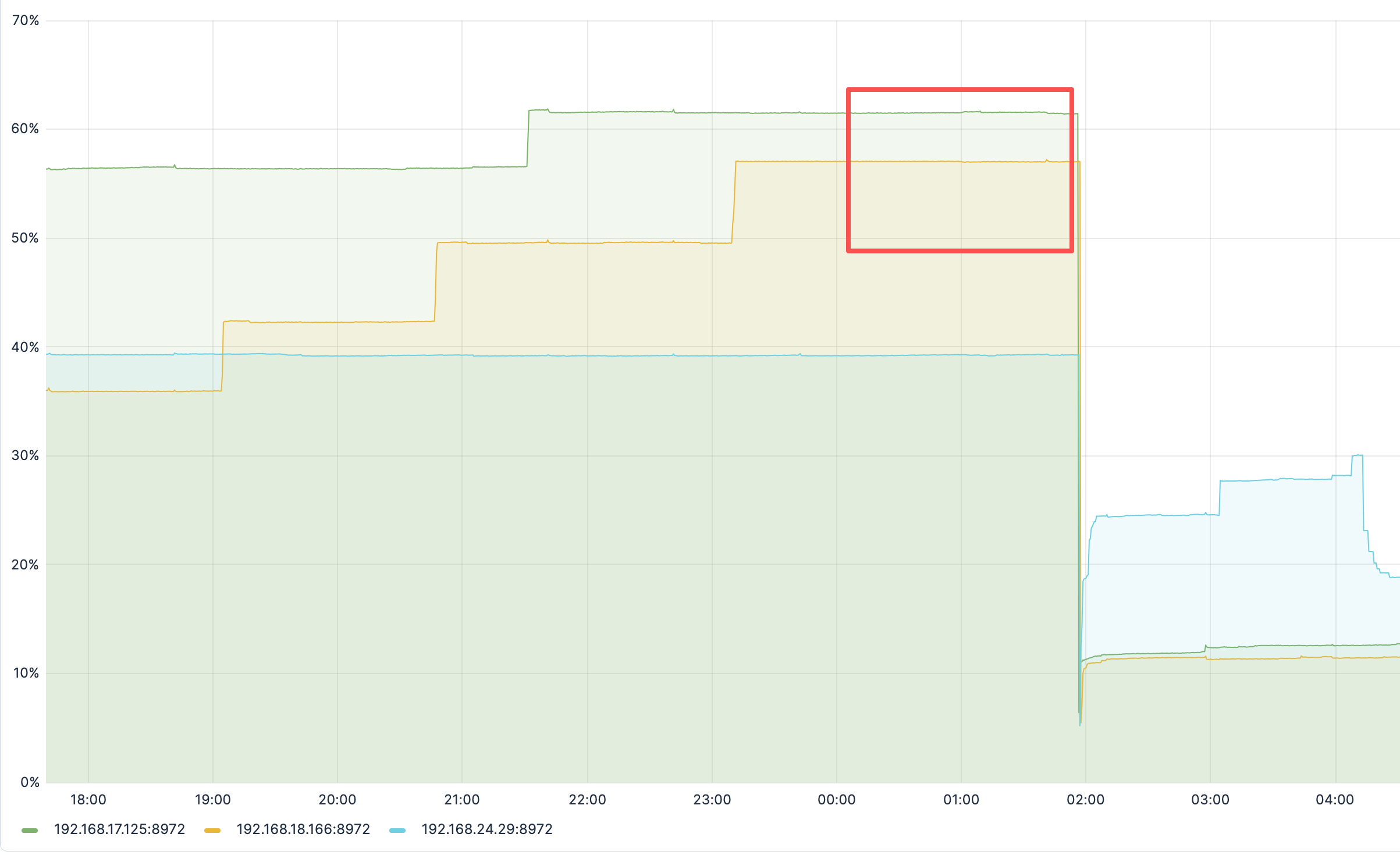
出问题时候的内存使用情况,FE节点内存32G,使用60%左右,持续了1个多小时。我们就把集群fe重启了。
image.png

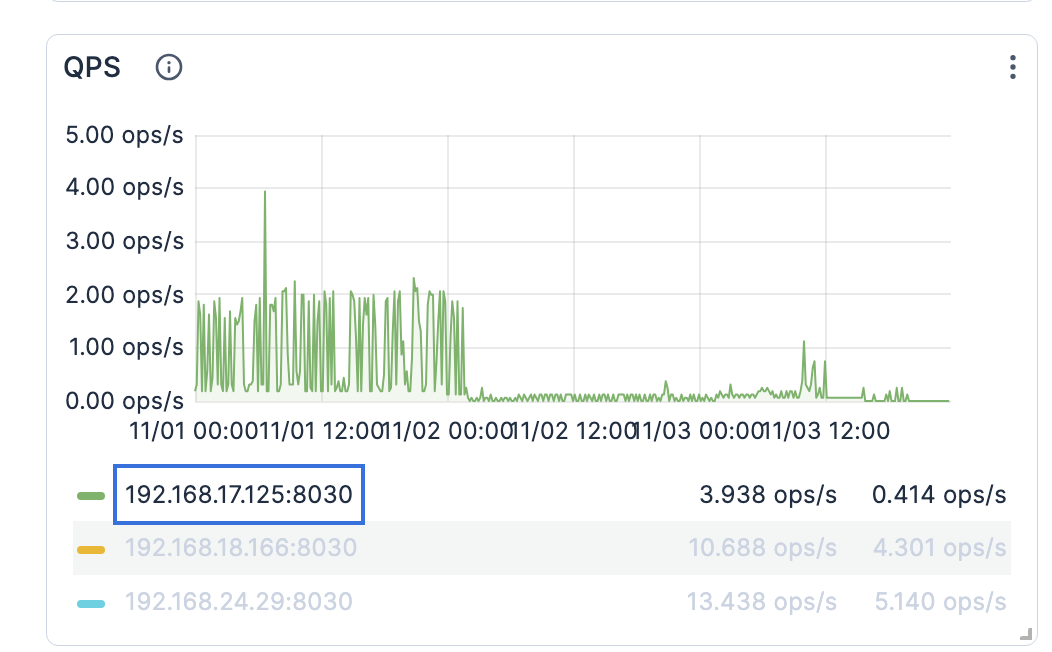
重启之后还有个问题就是其中一个fe节点的 RPS和QPS指标都接近为0.
image.png